Why BYOM Matters in Enterprise Contexts
Most enterprises are not starting from zero with AI. They already have investments in OpenAI enterprise agreements, Azure or AWS infrastructure, and compliance frameworks that mandate data residency.
The challenge isn’t access to AI. It’s integrating AI into Salesforce in a way that respects existing constraints.
BYOM addresses this by letting organizations use their chosen models—GPT‑4, Claude, Gemini, or fine‑tuned internal models—inside Salesforce workflows. The promise is flexibility. The reality is that each BYOM path carries different architectural trade‑offs.
Four Ways to Incorporate BYOM in Salesforce
After conversations across the Enterprise Dreamin community, four primary approaches have emerged.

1. Salesforce Data Cloud + Einstein Studio
Salesforce’s native answer to BYOM runs through Einstein Studio as part of Data Cloud.
CRM data flows into Data Cloud, where it is unified into customer profiles. External AI platforms like SageMaker, Vertex AI, and Azure connect through Einstein Studio. Outputs flow back into Salesforce via Prompt Builder and Agentforce.
What this approach assumes:
- You are already deploying Data Cloud for customer 360 initiatives
- You want a unified data layer feeding your AI models
- You prefer governance through Salesforce’s trust infrastructure
- You have the timeline and budget for platform‑level investment
The trade‑offs:
Data Cloud is a significant commitment. Pricing is based on profiles and segments, implementation timelines stretch into months, and your data flows through Salesforce infrastructure—which may or may not align with your security team’s preferences.
This path makes sense when Data Cloud is already on your roadmap. Adding AI becomes an extension of that investment, not a separate initiative.
2. AppExchange Native Tools (GPTfy and Others)
A different architectural pattern has emerged through AppExchange: native applications that connect directly to AI providers without requiring Data Cloud.
GPTfy is a mature example. It installs as a managed package, uses Salesforce Named Credentials to connect to your AI endpoint (Azure OpenAI, AWS Bedrock, Google, Anthropic, or direct API), and surfaces AI directly on Salesforce records.
What this approach assumes:
- You want AI capabilities without adding Data Cloud to your architecture
- You have existing AI provider agreements you want to leverage
- Speed matters—you need to be live in days, not months
- Your compliance team requires data to stay within your cloud environment
The trade‑offs:
You do not get the unified customer profile layer that Data Cloud provides. You manage your own AI provider relationship. You are dependent on an AppExchange vendor for ongoing feature development.
Other tools in this category include Peeklogic AI Connector (multi‑agent orchestration), ChatGPT AI Assistant (lightweight LWC integration), and OpenAI‑specific packages. Enterprise readiness varies widely—particularly around PII masking, audit logging, and compliance certifications.
3. Custom Apex Integration
Some teams build their own integration layer using Apex callouts to AI APIs.
The architecture is straightforward: Remote Site Settings for the AI provider, Apex classes to handle API calls, Lightning components to surface results, and custom logic for error handling and logging.
What this approach assumes:
- You have strong Salesforce development resources
- Your requirements do not fit any packaged solution
- You want complete control over every implementation detail
- You can absorb ongoing maintenance as AI APIs evolve
The trade‑offs:
You build and maintain everything. No pre‑built PII masking unless you implement it. No compliance certifications unless you manage them. Every API change requires code updates.
This path makes sense for truly unique requirements, but teams often underestimate the ongoing maintenance burden.
4. Hybrid Approaches
In practice, many enterprises do not choose one path exclusively.
A common pattern: Salesforce native AI for deeply embedded, standardized CRM intelligence; AppExchange tools for workflows requiring specialized reasoning or faster deployment; custom integration for edge cases that do not fit either.
This layered approach reflects architectural maturity by using platform capabilities where consistency matters and organization‑owned tools where adaptability matters.
The Comparison That Actually Matters
On infrastructure requirements: Salesforce’s native BYOM requires Data Cloud—non‑negotiable. AppExchange tools and custom Apex integrations do not.
On time to production: Data Cloud implementations take months. AppExchange tools can be live in days. Custom builds land in weeks depending on complexity.
On model flexibility: all three approaches support multiple AI providers, but the management layer differs—Einstein Studio configs vs. AppExchange admin UI vs. your own architecture.
On data flow: Salesforce BYOM routes data through Salesforce infrastructure. AppExchange tools usually route directly to your AI endpoint. Custom builds are fully controlled.
On PII protection: Salesforce provides the Trust Layer. Mature AppExchange tools include built‑in masking. Custom builds require you to implement and audit protection yourself.
On compliance: Salesforce manages certifications. AppExchange vendors provide their own (quality varies). Custom builds mean you own the audit conversation.
On pricing: Data Cloud uses per‑profile and credit‑based pricing. AppExchange tools typically use per‑user models (GPTfy is $20/user/month). Custom builds cost development upfront and maintenance ongoing.
On long‑term maintenance: Salesforce maintains platform features. AppExchange vendors maintain their tools. Custom code is maintained by your team, including API changes, security patches, and feature requests.
Questions Worth Asking Before You Decide
- Is Data Cloud already on your roadmap?
If yes, Salesforce’s native BYOM becomes easier to justify. The AI layer extends an investment you are already making.
If no, adding Data Cloud just for AI creates significant overhead. AppExchange tools offer a faster path.
- Where must your data live?
Some security teams require data to flow directly to your cloud environment, not through intermediate platforms. This constraint shapes which approaches are viable.
- How fast do you need to move?
Data Cloud takes months. AppExchange tools deploy in days. Custom builds fall in between.
- Who is responsible long‑term?
Data Cloud needs platform expertise. AppExchange tools are usually admin‑configurable. Custom builds require ongoing developer attention.
- What is your appetite for vendor dependency?
Every approach introduces dependency—on Salesforce, an AppExchange vendor, or your own team. Choose the dependency you can manage best.
What We’re Seeing in Practice
Across conversations in the Enterprise Dreamin community, a few patterns keep emerging.
Teams that start with Data Cloud when it is not already planned often struggle. Implementation complexity delays AI adoption, and the budget conversation becomes about platform investment rather than AI capabilities.
Teams that choose the cheapest AppExchange option often hit walls later. Missing enterprise features, PII masking, audit logs, and compliance certifications create problems when legal and security teams review the implementation.
Teams that build custom when a packaged solution exists often underestimate maintenance. The initial build feels controlled. The ongoing upkeep as AI APIs evolve becomes a recurring tax.
The most successful implementations start with a clear understanding of constraints—security requirements, existing architecture, timeline, and long‑term ownership—rather than starting with a specific tool.
A Framework for the Decision
Rather than recommending a specific path, here is a framework for thinking through the decision:
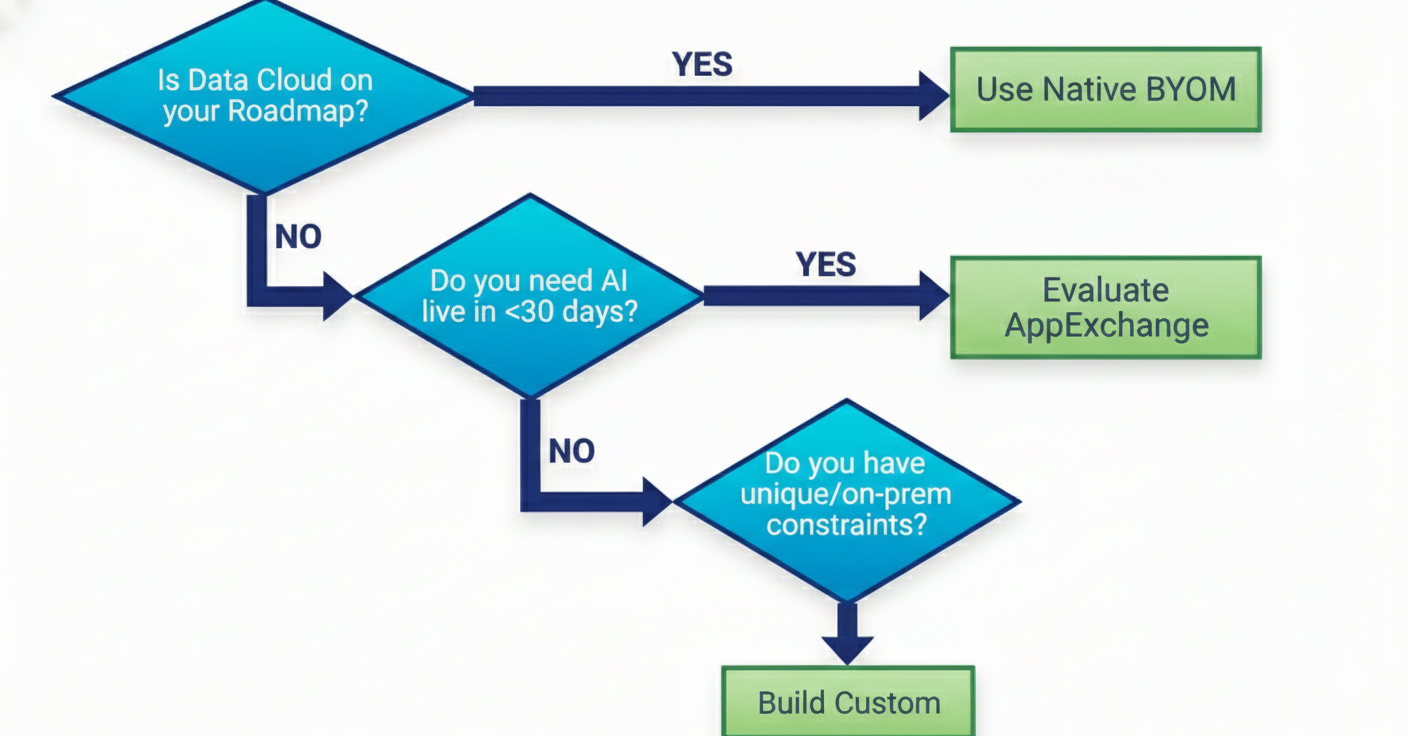
- If Data Cloud is already part of your architecture: Salesforce’s native BYOM is the path of least resistance. The AI layer integrates naturally with your existing data strategy.
- If you need AI capabilities without platform‑level investment: evaluate AppExchange tools based on enterprise requirements like compliance certifications, PII handling, model flexibility, and vendor stability.
- If you have truly unique requirements: custom integration gives you complete control, but plan for ongoing maintenance.
- If you are not sure yet: start with a constrained pilot. Test assumptions. Make sure you understand the real requirements before committing to architecture.
The Larger Question
BYOM in Salesforce is not really about which tool to use. It is about how AI fits into your enterprise architecture.
The model layer—who controls it, where data flows, how governance works—becomes part of how your systems operate. That makes this an architectural decision, not a feature selection.
Teams that approach it as such tend to make better choices.