The $348,000 Question
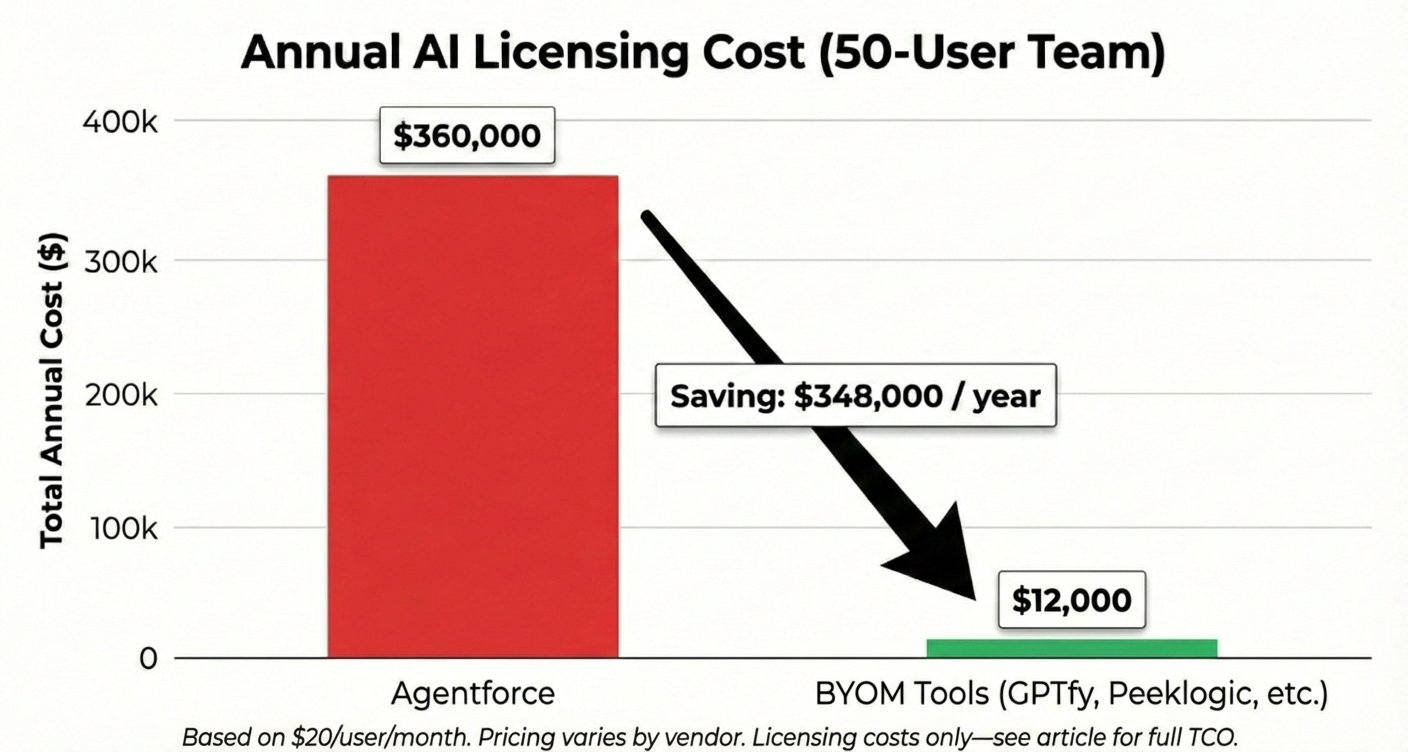
A 50-person sales team running Agentforce at $600/user/month (midpoint of typical range) spends $360,000 annually on AI licensing.
The same team running a bring-your-own-model tool at $20/user/month spends $12,000.
The difference—$348,000—funds the entire alternative deployment, a full-time headcount, and budget left over for experimentation.
This math explains why “Agentforce alternatives” has become one of the most searched terms in enterprise Salesforce architecture. Not because Agentforce lacks capability, but because the cost-to-value equation does not work for every organization.
This guide breaks down what Agentforce actually costs, why teams look elsewhere, and the four paths available—with enough detail to make a real decision.
Short on time?
Agentforce costs $500–650+/user/month, requires Data Cloud, and takes 4–9 months to deploy. Four alternatives exist: (1) Agentforce itself if you have time and budget, (2) BYOM tools like GPTfy or Peeklogic—fastest and cheapest, (3) point solutions like Intercom or Zendesk for single use cases, or (4) horizontal platforms for AI beyond Salesforce.
Most teams that cannot justify Agentforce land on Path 2. Skip to “When You Should NOT Choose Agentforce” to quickly self-qualify.
What Agentforce Actually Costs
Agentforce is Salesforce’s native AI agent platform—deeply integrated, expensive, and slow to deploy. The pricing is not a single line item:
- Agentforce licensing — varies by agreement, often bundled with Enterprise/Unlimited editions
- Data Cloud — $100–250/user/month (required, scales with data volume)
- Einstein credits — consumption-based AI usage units; varies by usage
- Implementation services — $150K–500K+ one-time professional services
- Total (ongoing) — $500–650+/user/month before implementation costs
For a 200-person sales organization, that is $1.2–1.5M annually before measuring a single outcome.
Implementation timeline: 4–9 months is typical. This breaks down as 6–12 weeks for Data Cloud configuration, 4–8 weeks for organizational readiness, 4–6 weeks for agent development, and 4–8 weeks for pilot and rollout. These phases overlap but rarely compress.
Teams that shortcut Data Cloud preparation encounter data quality issues that delay everything else.
Pricing ranges reflect enterprise agreements reported across Salesforce architecture communities and sources like Salesforce Ben. See Salesforce’s Agentforce pricing page for current list rates.
Why Teams Look for Alternatives
Five friction points appear consistently:
- Data Cloud dependency — requires a prerequisite implementation before agent work can begin
- Timeline pressure — 4–9 months exceeds most executive patience
- Cost structure — $500–650+/user/month is difficult to justify without proven ROI
- Stranded AI investments — existing OpenAI, Anthropic, or Google agreements are not usable
- Data residency — some security teams require data to flow only through organization-controlled infrastructure
Data Cloud dependency, timeline pressure, and cost are the most common reasons teams look elsewhere.
When You Should NOT Choose Agentforce
Before evaluating alternatives, check whether Agentforce even fits your constraints:
- Timeline under 6 months → you will not reach production in time → Path 2, then migrate later
- Data Cloud not deployed or funded → you would pay for infrastructure you cannot use → Path 2, 3, or 4
- Existing AI provider agreements → Agentforce will not use them; you pay twice → Path 2 (BYOM)
- Strict data residency requirements → Agentforce routes through Salesforce’s trust layer → Path 2 (direct to your cloud)
- Budget under $300/user/month → cannot afford fully-loaded cost → Path 2 or 3
- Need to prove ROI before committing → Agentforce upfront investment too large for pilots → Path 2
If none of these apply—you have Data Cloud, 12+ months, and budget for premium pricing—Agentforce remains the most deeply integrated option. For everyone else, keep reading.
The Four Paths
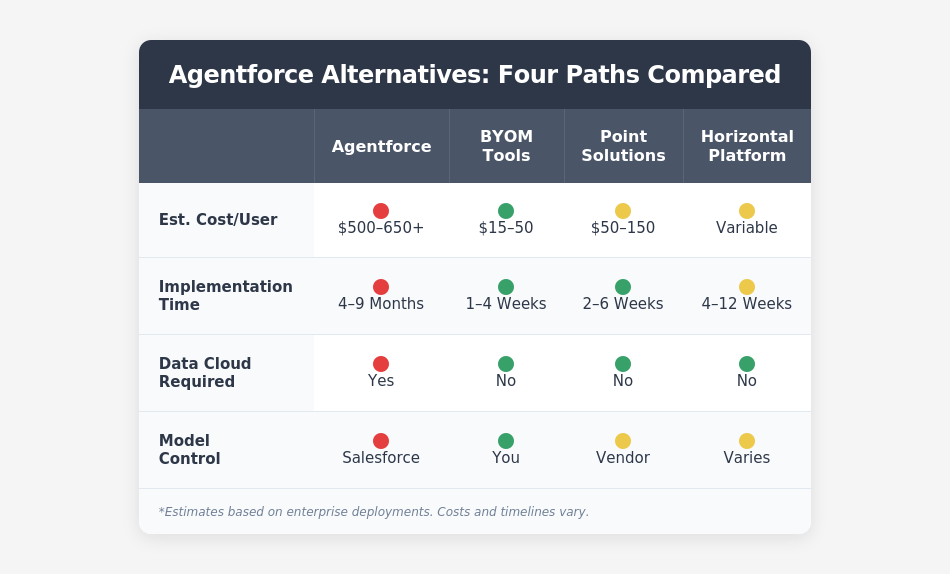
This guide focuses primarily on Path 2, which fits most organizations evaluating alternatives. Paths 3 and 4 are covered for completeness.
Path 1: Agentforce
What you gain: deepest Salesforce integration. Unified trust layer. Single vendor relationship. Roadmap alignment with Salesforce’s direction.
What you trade: timeline, budget, flexibility, and the ability to use existing AI provider agreements.
When it fits: organizations already invested in Data Cloud with 12+ month planning horizons and budgets that accommodate premium pricing.
Path 2: BYOM Tools
This is where most teams evaluating alternatives land.
BYOM (Bring Your Own Model) tools embed AI into Salesforce without requiring Data Cloud. Your data flows directly to your AI provider—OpenAI, Anthropic, Google—through your own cloud accounts, rather than through an intermediary platform.
Most include PII masking (automatic redaction of personally identifiable information before data leaves Salesforce).
What you gain: speed (days to weeks, not months). Predictable pricing. Model flexibility. Data residency control.
What you trade: Data Cloud integration depth. Unified Salesforce support. Some advanced orchestration capabilities.
Tool snapshot:
- GPTfy — $20/user/month flat. Fastest deployment; built-in PII masking; HIPAA/GDPR/SOC 2. Email/chat support; no 24/7 phone.
- Peeklogic AI Connector — custom pricing. Automatic cost optimization across models. Dedicated CSM for enterprise tiers.
- Einstein Bots — included with Service Cloud. Zero additional cost; simplest setup (scripted, not autonomous). Salesforce support.
Support reality check: BYOM vendors are smaller companies. GPTfy and Peeklogic do not offer 24/7 phone support with guaranteed SLAs. For mission-critical workflows where downtime means revenue loss, this matters. Agentforce—for all its costs—comes with Salesforce’s enterprise support infrastructure.
When BYOM Tools Don’t Work
Path 2 isn’t universally better. These tools fail in specific scenarios:
- Complex multi-step orchestration — BYOM tools handle single-turn tasks well. Multi-agent workflows push their limits → Agentforce or custom development
- Deep Data Cloud integration — BYOM tools cannot access unified profiles across systems → Agentforce
- Regulated industries with Salesforce-specific audit requirements — some frameworks require AI actions logged within Salesforce’s trust layer → Agentforce
- No internal AI/prompt expertise — BYOM tools require prompt design and iteration → Point solutions with pre-built workflows
- Mission-critical workflows requiring enterprise SLA — small-vendor outages are risky → Agentforce or Einstein Bots
The honest truth: Path 2 tools trade depth for speed. If your use cases are simple and speed matters, that’s a good trade. If your use cases are complex and you have time, Agentforce’s depth may be worth the cost.
Scenario: The Q4 Deadline
(Composite of 3 enterprise implementations)
A 75-person sales team promised AI-powered lead scoring by Q4. They started Agentforce evaluation in July. By October, they were still configuring Data Cloud. They pivoted to a BYOM tool, deployed in three weeks, and hit their deadline. Twelve months later, they are still running the lighter tool—Agentforce remains “on the roadmap” but keeps getting deprioritized.
Scenario: The Compliance Constraint
(Composite of 2 healthcare implementations)
A healthcare organization needed AI in Salesforce but could not route patient data through third-party platforms. Agentforce’s architecture did not satisfy their security team. A BYOM tool—where data flows directly from Salesforce to their own Azure OpenAI instance—passed compliance review in two weeks. They deployed to 200 users within the month.
A Note on Total Cost
The $348,000 savings figure compares licensing only. That’s not the complete picture.
Path 2 tools require internal effort: prompt engineering, integration maintenance, user training. Agentforce implementations also carry hidden costs beyond licensing: ongoing admin time, Einstein credit overages, and the opportunity cost of a 6‑month implementation.
Year 1 comparison (50-person team, estimates):
- Licensing — Agentforce $360,000 vs. Path 2 $12,000
- Implementation services — Agentforce $150,000–250,000 vs. Path 2 $0–15,000
- Internal admin/maintenance — Agentforce $40,000–60,000 vs. Path 2 $20,000–40,000
- Prompt engineering/training — Agentforce included vs. Path 2 $10,000–20,000
- Year 1 total — Agentforce $550,000–670,000 vs. Path 2 $42,000–87,000
Even accounting for hidden costs, the gap remains significant—typically $450,000+ in Year 1 savings. But the gap is smaller than licensing-only comparisons suggest. Plan accordingly.
Estimates based on typical enterprise implementations. Actual costs vary by internal rates, existing capabilities, and scope.
Path 3: Point Solutions
Platforms optimized for a single workflow—typically support or lead generation—that integrate with Salesforce without attempting general-purpose capabilities.
What you gain: deep optimization for specific use cases. Mature features from vendors focused entirely on that workflow.
What you trade: breadth. Multiple workflows require multiple tools.
- Intercom Fin — customer support, strong NLP, knowledge base integration
- Zendesk AI — multichannel service (email, chat, social, phone) automation
- Freshdesk — mid-market support, faster setup
- Qualified — pipeline generation, website visitor ID, meeting scheduling
When it fits: organizations with a dominant use case that want depth over breadth, and where Salesforce integration is not the primary requirement.
Path 4: Horizontal AI Platforms
AI platforms treating Salesforce as one integration among many.
What you gain: broader reach across your tech stack. Single AI layer for CRM, productivity, and operations.
What you trade: CRM-specific depth. Salesforce-specialized support.
- GPTBots — integrations across Salesforce, Google Workspace, Notion, Zapier
- Custom Apex development — maximum control, maximum maintenance burden
Custom development carries ongoing costs—API updates, security patches, compliance documentation—that teams often underestimate.
When it fits: organizations whose AI needs extend significantly beyond Salesforce.
How to Choose: Five Questions
- What’s your timeline? This quarter → Path 2 or 3. Six to twelve months → Path 1 viable if Data Cloud exists. No fixed deadline → start with Path 2 for speed.
- Is Data Cloud deployed? Yes and central → Path 1 integration matters. Planned but not funded → Path 2, then reassess. Not on roadmap → Paths 2, 3, or 4.
- Do you have existing AI provider agreements? Yes → Path 2 lets you use them. No → Path 1 may be simpler, but Path 2 is still likely cheaper.
- What are your data residency requirements? Data must stay in your infrastructure → Path 2 by design. Standard compliance acceptable → all paths viable.
- Is your use case CRM-centric or broader? Salesforce workflows only → Path 1 or 2. Single dominant use case → Path 3. AI needed across multiple systems → Path 4.
What Happens When You Tell Your Salesforce AE
When you inform your account executive that you’re evaluating alternatives, expect increased urgency on pricing, offers to accelerate timelines, solution engineers addressing technical objections, and reminders about integration depth.
What’s realistic:
- 10–20% discount on Data Cloud if you have competing quotes
- Timeline acceleration of 2–4 weeks
- Access to beta features or dedicated solution engineering
What’s not realistic:
- Waiving the Data Cloud requirement
- Matching Path 2 pricing
- Compressing a 6-month timeline to 6 weeks
What not to say:
- “We’re just using this for leverage” (they will call the bluff)
- “We’ve already decided” (closes negotiation prematurely)
- Specific competitor names unless you are genuinely evaluating them
Salesforce teams distinguish genuine evaluation from bluffing. Organizations that navigate this well treat it as a real decision.
Starting with an Alternative and Migrating Later
This is increasingly common. Deploy a Path 2 tool for immediate use cases while keeping Agentforce on the longer-term roadmap.
- Demonstrate value quickly
- Validate use cases before large investments
- Build organizational AI capability
- Preserve optionality
Path 2 tools are processing layers, not data platforms. Migration means reconfiguring workflows, not moving data. Skills transfer regardless of platform.
Scenario: The Hybrid Approach
(Composite of 4 enterprise implementations)
A financial services firm deployed a BYOM tool for sales email drafting and case summarization—live in three weeks, measurable productivity gains within 60 days. Agentforce remains in their 18‑month roadmap for complex workflows. Their strategy: prove ROI with the lighter tool, use the savings to fund the eventual Agentforce implementation. If the lighter tool keeps meeting their needs, they’ll reassess.
What We’d Do
Start with Path 2. Prove value in 60 days. Then decide whether Agentforce’s depth justifies 10–30x the cost.
The exception: organizations already running Data Cloud with complex orchestration needs may find Agentforce worth the investment and timeline.
The hybrid approach—ship fast, prove value, migrate if needed—reduces risk without sacrificing optionality.
Common Questions
- Is Agentforce worth the cost? For organizations already running Data Cloud with large budgets, yes. For everyone else, alternatives provide better value.
- How long does Agentforce take to implement? 4–9 months for enterprise deployments. Existing Data Cloud shortens this; starting from scratch extends it.
- Can I use my own AI models with Salesforce? Not through Agentforce. Path 2 tools enable BYOM architecture connecting directly to your OpenAI, Anthropic, or Google agreements.
- What’s the difference between Agentforce and Einstein Bots? Einstein Bots are scripted, rule-based, and simple to set up. Agentforce is autonomous, multi-step, complex to deploy, and requires Data Cloud.
- Do I need Data Cloud for AI in Salesforce? For Agentforce, yes. For Path 2 tools, no.
The Strategic Trade-Off
The alternatives discussion reduces to one question: how much of your AI strategy should your platform vendor own versus your organization control?
- Agentforce means Salesforce owns the models, trust layer, roadmap, and pricing. You gain integration depth. You accept dependency.
- Alternatives mean you control models, data flows, and architecture. You accept more integration complexity.
Make the choice deliberately—or your vendor will make it for you.
About This Guide
This is an independent analysis. We have no financial relationship with Salesforce, GPTfy, Peeklogic, or any vendor mentioned in this article—no referral fees, no affiliate commissions, no partnership revenue.
Our analysis draws on publicly available pricing, vendor documentation, and patterns discussed across Salesforce architecture communities including the Trailblazer Community, Reddit’s r/salesforce, and practitioner blogs. Scenarios are composites based on implementation patterns; no single company is represented.
We built this guide because we kept seeing the same questions in architecture discussions and wanted a single resource that treated the decision honestly—including when Agentforce is the right choice.
Corrections or updates? If pricing has changed or we’ve mischaracterized a product, let us know: [email/contact].
Last updated: January 2025. Verify current pricing with vendors before making decisions.
What’s Next
Evaluate your fit: work through the five questions in “How to Choose” with your team. Document your constraints—timeline, budget, Data Cloud status, existing AI agreements—before talking to vendors.
Research the options:
- Salesforce’s Agentforce documentation
- GPTfy and Peeklogic
- Salesforce Ben’s ongoing Agentforce coverage
Get specific: every organization’s constraints are different. Use this guide as a starting framework, then validate pricing and capabilities directly with vendors for your specific situation.